Commission
GCI tracking that knows whether you are ahead or behind
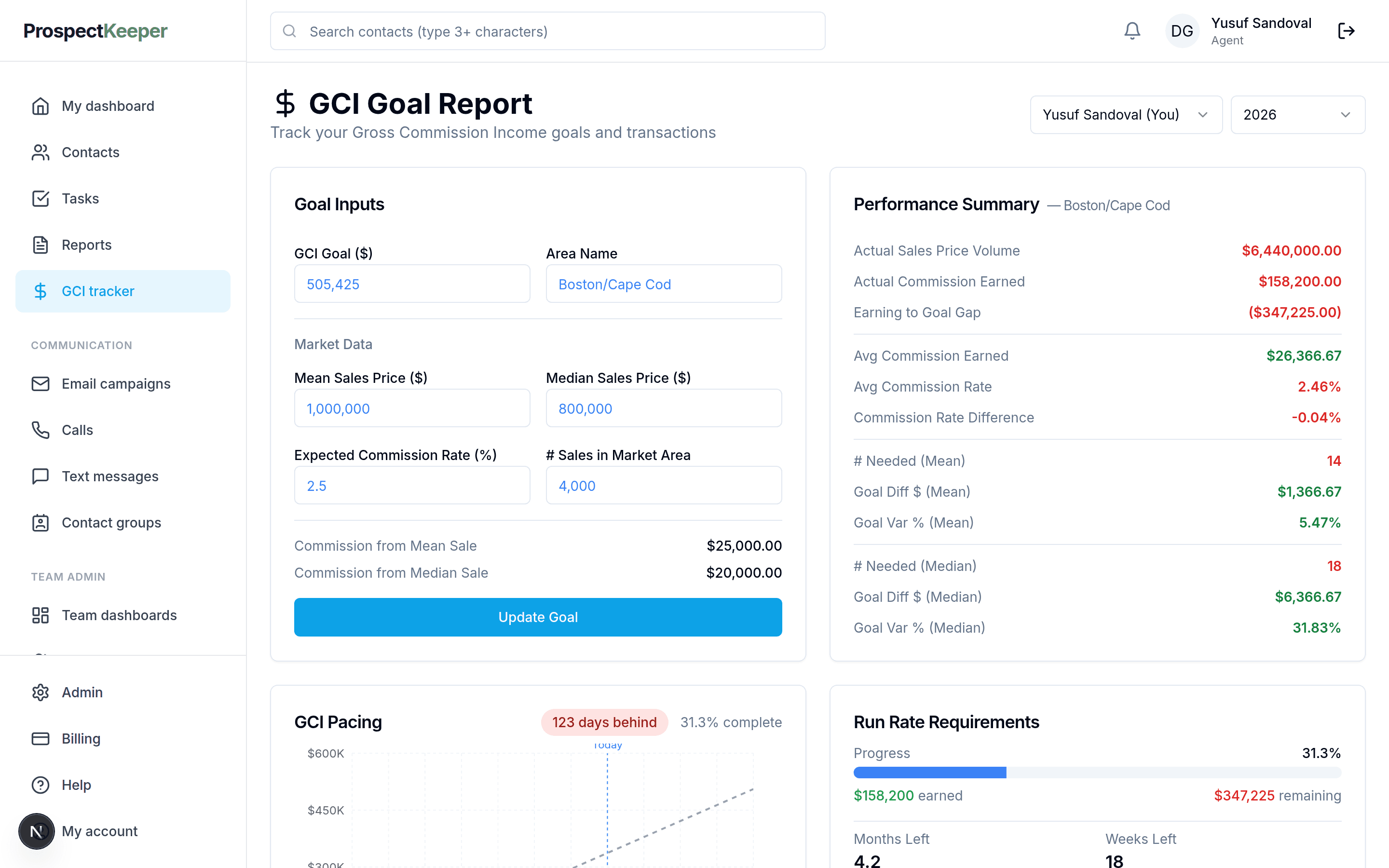
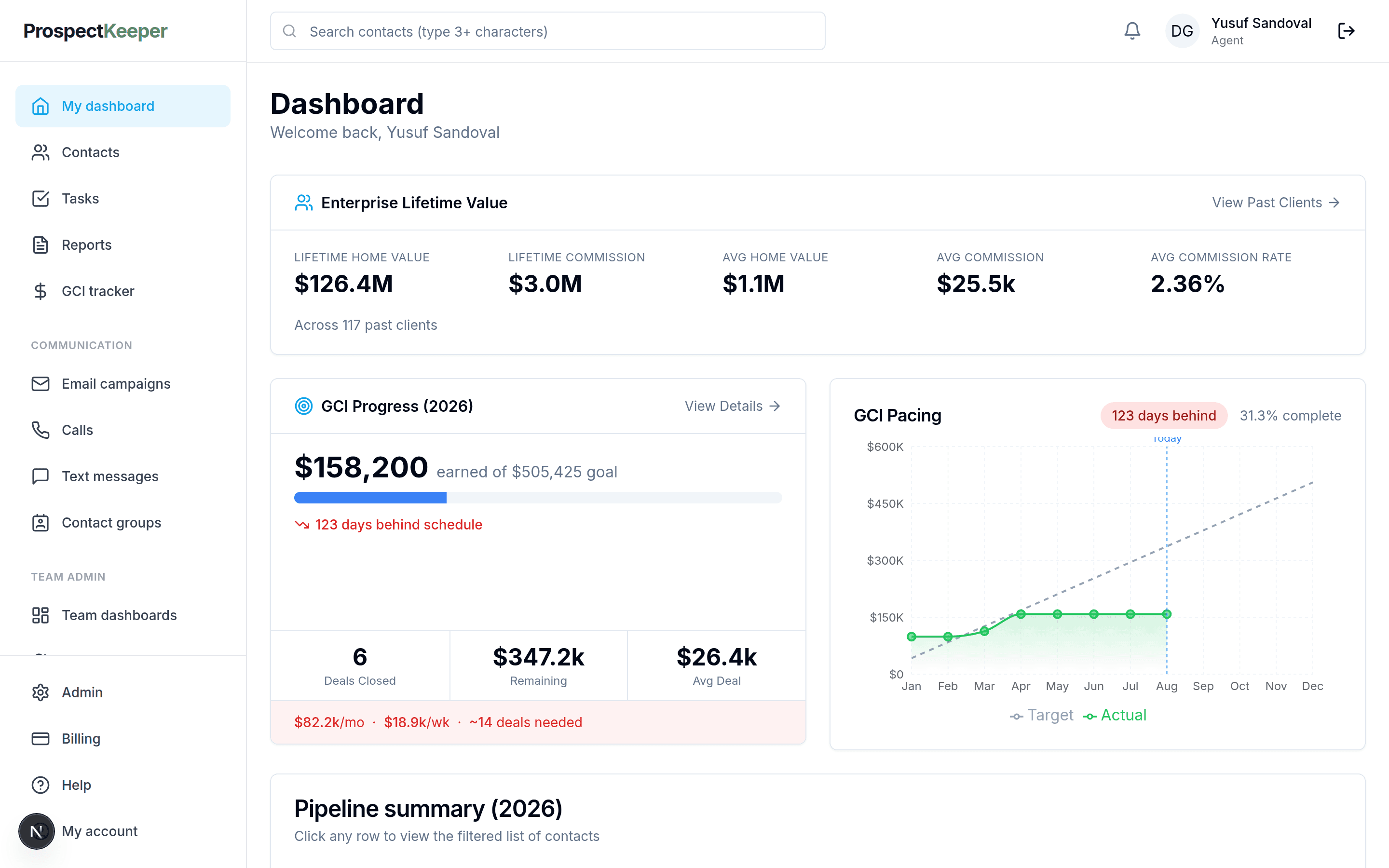
Knowing you have earned $158,200 is a fact. Knowing you are a hundred and twenty-three days behind the pace that gets you to your goal is a decision. ProspectKeeper tracks gross commission income against a yearly goal per agent and reports the gap while the year is still long enough to close it.
The number that arrives too late to act on
Most agents find out how the year went in December. The commission is tracked, in the sense that it is written down somewhere — a spreadsheet tab, a brokerage statement, the back of the pipeline report — but it is tracked as history. By the time the total is visible it describes a year that is already over. The useful version of the number is the one that says, in April, that the current rate of closing lands twenty per cent short, because April is when a different April is still available to you.
Why ProspectKeeper for this
All of it ships today on ProspectKeeper Connect at $99/month — and the pipeline itself is free to start on, for as long as you like.
A goal per agent, and pacing against it
Set a yearly GCI goal. Commission is tracked against it as deals close, and the product reports earned, remaining, and how far ahead or behind the pace you are. The point is the third number: the first two are a scoreboard, the third is an instruction.
Commission is a first-class field, not a note
Every deal carries its sale price, commission rate and side, so GCI is computed from the deals rather than typed into a summary someone maintains by hand. Change a sale price and the goal report changes with it.
It is on the dashboard you already open
Commission progress sits next to the pipeline and the follow-ups on the agent's own dashboard, so the goal is visible during the work rather than in a report you have to remember to run.
The whole book, sortable, when you need the detail
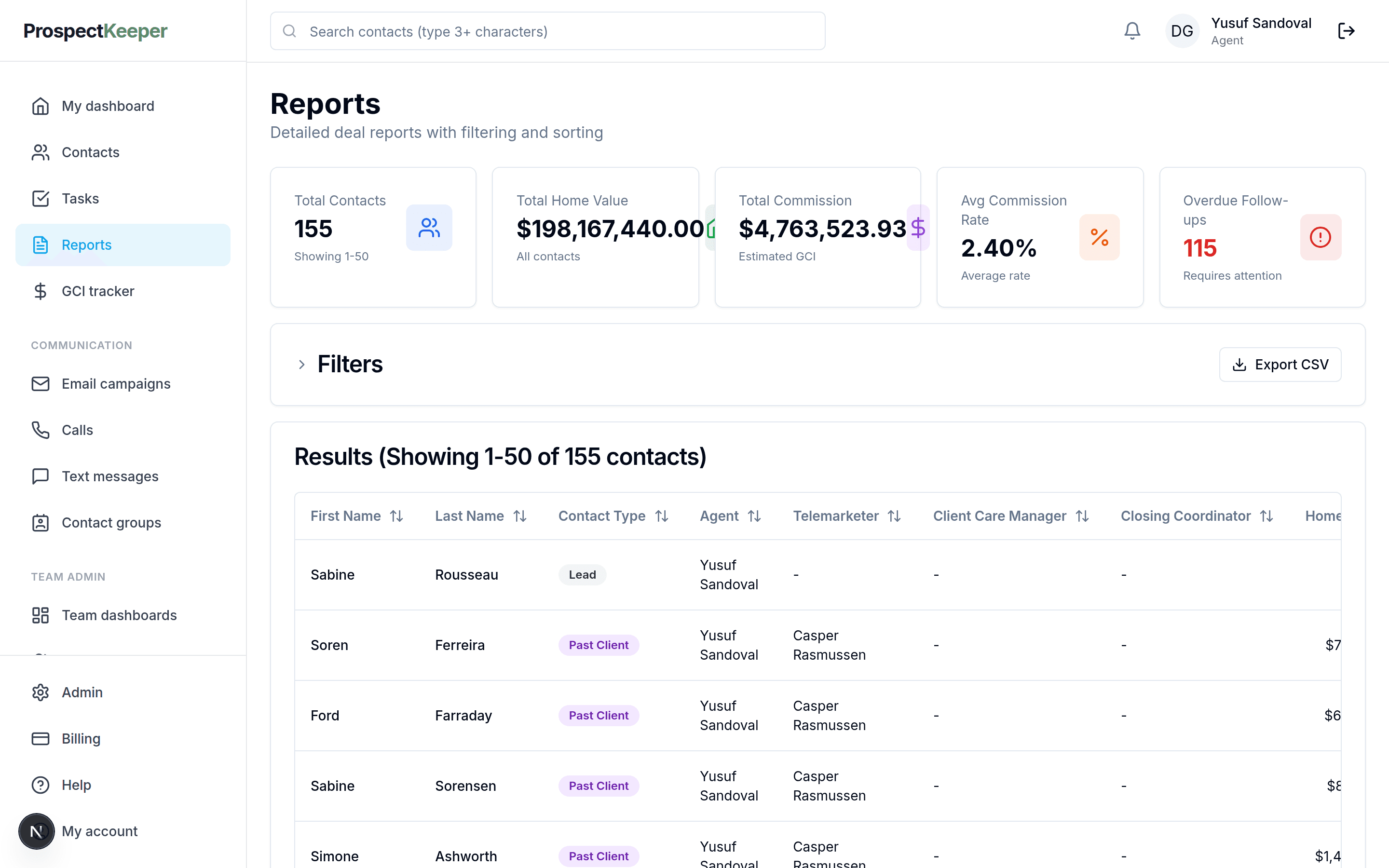
The reports screen carries totals across the book with filters, a column per role and CSV export, for the month-end questions the dashboard is too small to answer.
How it works
From nothing set up to using it on a Tuesday.
Set the yearly goal
One number per agent, for the year. If you are not sure what it should be, the calculator works backwards from take-home income to the deals, appointments and conversations it implies.
Record deals with their commission
Each deal carries a sale price, a commission rate and a side — listing, buyer, both or rental. GCI comes off those fields rather than a total anyone maintains separately.
Close deals as they close
Moving a deal to closed is what credits the commission. Pacing recalculates from the deals themselves, so the report is only as stale as your pipeline.
Read the gap, not the total
The dashboard shows earned, remaining, deals still needed and how far off the pace you are. Behind by a month in March is a prospecting problem you can still fix; behind by a month in November is a different conversation.
What you stop maintaining by hand
GCI tracking is usually a spreadsheet that starts clean in January and stops being true in March. Computing it from the deals removes the maintenance rather than making it easier.
The commission spreadsheet
No parallel tab to reconcile against the pipeline, and no formula that broke when someone inserted a row.
The month-end summing exercise
Totals come off the deals, so they are current whenever you look rather than whenever you last updated them.
The pacing arithmetic
Deals needed and the gap to goal are computed, not worked out on paper each quarter.
What it does not do
Worth knowing before you spend a week moving in. A switcher finds these in the first fortnight anyway, and hearing them from us first is cheaper for everyone.
- Goals are yearly, per agent. There is no quarterly or monthly goal structure today.
- Commission is computed from the deal's own price, rate and side — brokerage caps and post-cap split flips are not modelled inside the product.
- Export is CSV. There is no Excel (.xlsx) export and no accounting-package integration.
- There is no MLS connection, so sale prices are the ones recorded on the deal.
Questions
What exactly does GCI mean here?
Gross Commission Income: the commission earned on a deal before the brokerage split and before expenses. ProspectKeeper computes it from the sale price, the commission rate and the side recorded on each deal, and tracks the total against the yearly goal you set.
How does the pacing figure work?
It compares what you have earned against what you would need to have earned by today to finish the year on goal, and reports the difference in days. That framing is deliberate: a dollar gap invites you to hope, and a day count tells you how much prospecting has to change.
Can I track GCI for a team rather than one agent?
Goals are set per agent, and the reports screen totals across the book with a column per role, so a team lead can see each agent's progress and the combined position. The dedicated Team plan is on the waitlist; the reporting itself works today.
Does it handle rentals and referral sides?
Deals carry a side — listing, buyer, both, or rental — and the commission is computed per deal, so rental business is tracked alongside sales rather than left out of the total.
What happens to commission on a deal that falls through?
It is credited when the deal closes, so a deal that dies never counted toward the goal. If a closed deal is reopened or trashed the totals follow it, which means the goal report does not quietly keep crediting a sale that did not happen.
Can I get the numbers out?
The reports screen exports to CSV with the filters you applied, so the figures can go to your accountant or into whatever the brokerage uses at year end.
Read next
Try it against your own pipeline
Free to start. Set up your company, add your clients and work the list.